$ cat posts/your-agents-need-a-boss.md
Your agents need a boss
Table of contents
You probably think you’ll install Claude, the AI will solve all your problems, and you’ll finally have time to work on raising your Elo on chess.com.
But no, “sweetie”, that’s not how it works.
AI doesn’t solve your problems, you solve problems with AI. And this simple distinction is lost on a lot of people. Especially on some clueless executives who promise their bosses spectacular productivity gains. Or the promise of doing more with fewer people.
The reality, the one lived by those of us who have been working with agents for a good while, practicing what some call AI First Software Engineering, is quite different.
Working with AI demands a new discipline. New criteria, new tools, different processes.
The nature of the work doesn’t change, and the amount doesn’t go down. If anything, it can go up.
You’re not the “human in the loop”, no. Your role is to be the “expert in the loop”.
And when you start using AI for real, not to autocomplete functions but to delegate entire tasks to your agents, you quickly run into a lot of practical problems.
The first is how to split up the work. How do I parallelize it. How do I get the agents to work in a coordinated way. And most important of all, how do I avoid context-switching fatigue.
This problem has kept me busy for the last few months, and the fruit of that experience is a new project I want to introduce to you.
Its name is Lonko.
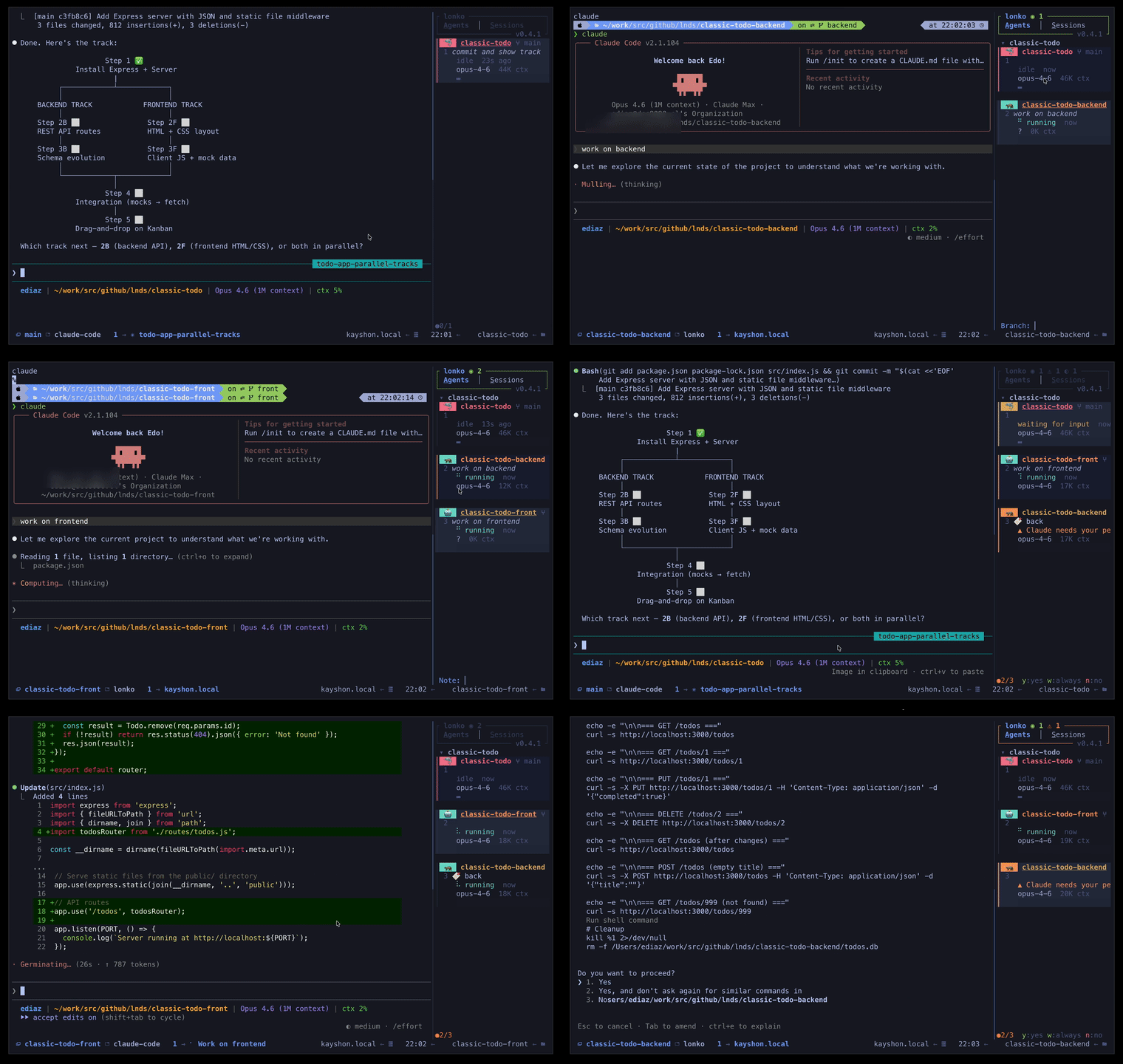
Lonko is a TUI (terminal user interface) tool written in Rust that monitors and controls multiple Claude Code sessions running in tmux.
The idea is to have a single, live view of all your agents: status, model, token usage, current activity.
The name comes from Mapudungun. Lonko is the head or the chief.
Greek has an equivalent term: “archos”, which means the same thing, head or chief. The word architect comes from there, from archos and tecton, which is builder, so the architect was the chief builder, or the site foreman.
But I’d rather use a name from my own land, the same way I used Kimun before.
A lonko is the leader of a Mapuche community, the one who coordinates and looks after his people. The metaphor is clear: this tool is the boss that watches over your Claude agents, keeps them organized and lets you direct them from a single place.
What exactly does it do?
- Live monitoring of all active Claude Code sessions, with status, tokens consumed and the current activity of each one.
- Permission handling without having to switch panes: when an agent asks you
can I run this?, you answer withy/w/nfrom wherever you are. - Git worktree management: create and destroy worktrees directly from the UI, because every agent should work in isolation.
- Fast navigation: jump between agents with keys or numeric shortcuts.
- Detail view: expand any session to see its full transcript.
- Terminal integration: if you use Ghostty, WezTerm or Kitty, you can map global keys to answer permission requests without even opening the panel.
All of this lives in a tmux window that appears and disappears with a shortcut. It’s not a 200MB Electron app, it’s not a VSCode extension, it’s not a cloud service. It’s a Rust binary that runs in your terminal and slips into the gaps of the workflow you already have.
The architecture
Lonko discovers sessions through three independent paths:
- Claude Code hooks: Claude fires lifecycle events that
lonko-hookforwards over a Unix socket. This is the initial implementation; Claude now has other ways to be controlled, which I plan to take advantage of, so this may change soon. - Filesystem watcher: monitors
~/.claude/sessions/to detect new sessions. - tmux scanner: every so often it scans the tmux panes looking for Claude processes.
Part of a triad
Lonko is not an isolated tool. It’s the second piece of a triad I’m building to work with AI agents for real.
The first was Kimun, which measures the quality of the code the agents generate.
The second is Lonko, which coordinates and watches over the agents while they work.
The third I’ll introduce in an upcoming post.
What matters for now is that these tools are not academic exercises or weekend projects. I use them every day, in my own work, solving my own problems. And I release them as open source because I believe the knowledge of how to work well with AI shouldn’t stay locked up in Twitter threads by “thought leaders” or, worse, by snake-oil salesmen who have never written a line of production code.
How to try it
Lonko lives at github.com/lnds/lonko. You need Rust, tmux and Claude Code installed. Installation is:
git clone https://github.com/lnds/lonko.git
cd lonko
./install.sh
The script takes care of compiling the binaries, installing the tmux scripts, generating the configuration and wiring up the Claude hooks. Then you add one line to your tmux.conf and that’s it: prefix + s brings up the panel.
It’s young software. It has rough edges. Features are missing. But it does what I need it to do, and so far it does it well.
AI doesn’t solve your problems. You solve them with it. And to do that well you need more than the model of the moment: you need to measure it, you need to direct it, you need a process. You need to treat agents as real collaborators and not as infallible oracles.
Lonko is my attempt to put that conviction into code. If it’s useful to you, use it. If not, I hope it inspires you to build your own.
If this topic interests you, subscribe to my Patreon. Your support matters: you’ll get access to extra content I’m preparing, and a say in choosing the topics this blog covers.
Comments
comments powered by Disqus