$ cat posts/is-your-boss-a-functional-programmer.md
Is your boss a functional programmer?
Your boss, and mine, without being IT people, programmers or software engineers, are probably better functional programmers than you are. Of course, because they most likely use one of the most popular functional languages in existence: Excel.
Yes, Excel, the thing so many of your non-IT colleagues use, supports the functional paradigm perfectly well.
First, in Excel you have values, numbers or sometimes text, that you put in cells. For example, you can put the value 2 in cell A1 and the value 3 in cell A2.
Then you have functions, or operations that work on the values found in a cell. For example, you can define that the value of cell A3 is calculated as A3 = A1 * A2. Excel will show you the value of applying this operation to the values available at that moment in cells A1 and A2; in our case A3 will show the number 6.
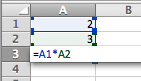
Defining the value of a cell as a function of two others
The "interesting" part is that this operation does not change the value of the cells used as arguments. This means that in Excel there are no side effects: the result of the function only affects those who use the result, not the input arguments.
Let’s see what happens if we add other equations to our spreadsheet, making some values depend on previous results.
For example: A4=A1+2, B3=A2A2, B4=A1-A2, C3 = B3-B4, C4 = B3B4.
Excel lets us see the dependencies in this sequence of calculations:
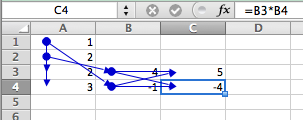
Dependencies between the cells
We say that the order of evaluation is given by the dependencies of the data.
Another interesting thing is that given the same input values the final result does not change. In our case, if A1 contains the value 1 and A2 contains the value 2, then cell C4 will always hold the value -4. No surprises: the value of cell C4 depends only on the input arguments and the sequence of intermediate calculations.
Consider the following function in C:
int calc(int x, int y) {
    static int z = 0;
    z = z + x * y;
    return z;
}
If we call this function the first time with the values 1 and 2, the result will be 2, but if we call it a second time, with the arguments 2 and 3, the result will be 8, and if we call it a third time, with the values 1 and 2, the result will be 10!
This happens because C allows side effects; in particular, declaring the variable z as static makes that value persist across every call to the function.
Functional programming languages forbid this option. There can be no side effects like these; the result of the function must be the same for the same input arguments.
Now, Excel, used at this level, along with a few predefined functions, operates as a functional language, but not all of Excel is functional, for example when you use macros, or create functions with extension languages such as VBA or others (like C#).
But most users use it at this level and, without realizing it, program in the functional paradigm.
The most important properties of functional programming are available in Excel at the basic level. The rest, all the complicated stuff that scares so many programmers, like combinators, monads, currying, reductions, the lambda calculus, etc., are more advanced topics which, despite their intimidating names, and despite the functional community’s habit of "talking fancy", are perfectly within the reach of any programmer.
But if you have never worked up the nerve to learn functional programming, maybe it’s time to open a spreadsheet and start playing with it. You’ll find it very illuminating.
I propose the following exercises:
Calculate the Fibonacci sequence in Excel
Is it possible to create recursive functions in Excel? (without using VB or some programming language to "extend" Excel).
(This post is also available on La Sombra de Dijkstra)
Comments
comments powered by Disqus